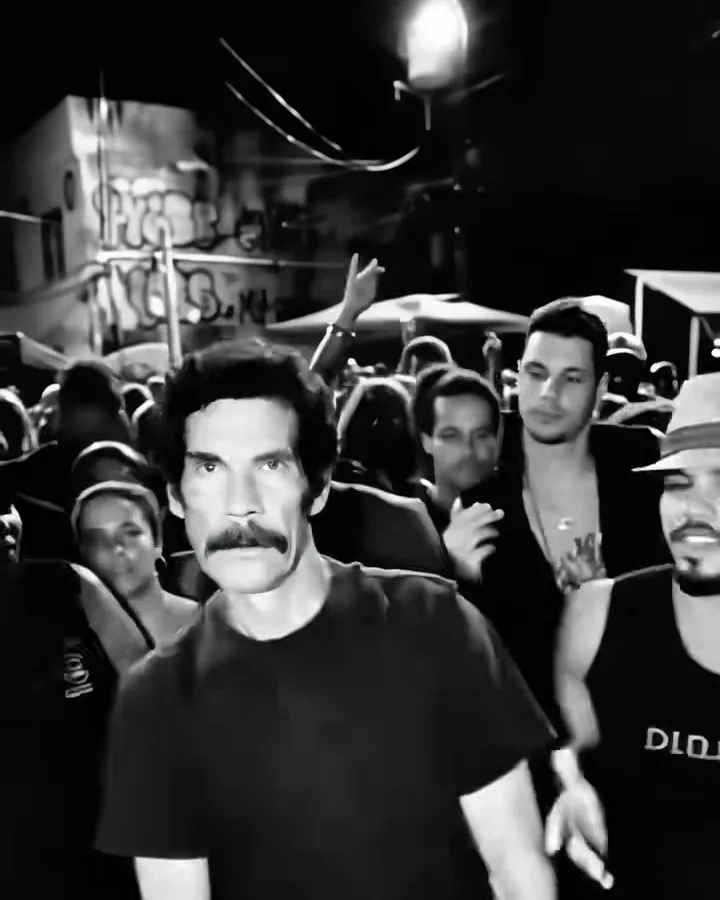
The same night, in grainy black-and-white film.. A packed open-air baile charme at night under the Viaduto de Madureira in Rio de Janeiro: hundreds of people dancing shoulder to shoulder, bright white floodlights on poles overhead, blue market tents and graffiti walls behind the crowd.
Updated Oct 20, 2026 · By the Baile Charme AI team
Generator
Make your baile charme ai video
Three choices and one tap. The shot list, the timing and the prompt are already built.
One of the most shared remakes of the trend dropped all colour: the floodlights turn into white flares, the crowd into silhouettes, and the dancer looks like a still from an old music documentary. Preto e Branco renders the whole clip in high-contrast monochrome with film grain, keeping your face and outfit from the photo.
Tips for the preto e branco
Contrast matters more than colour here: a photo with clear light and shadow on the face looks best.
Bright or patterned clothes read well in monochrome; very dark outfits merge with the crowd.
Want colour too? Render the Viaduto Classic with the same photo and post both.
What is already set for you
The subject: the person from the photo, dancing in the clothes they wear in the photo.
The scene: a packed open-air baile charme at night under the Viaduto de Madureira in Rio de Janeiro: hundreds of people dancing shoulder to shoulder, bright white floodlights on poles overhead, blue market tents and graffiti walls behind the crowd.
The timing: Every template follows the same 12-second shot list: the look back, the groove, the friend, the charme step and the turn.
Viaduto Classic: you, in your own clothes, owning the packed baile under the viaduct.
With Your Friend: two photos, two dancers: your friend joins you at your shoulder.
Casal no Charme: a couple in the crowd, dancing the charme step together.
Vovô no Baile: you at 75, still the best dancer at the baile.
80s Action Look: faded denim, a white tank top and a wide belt, like the remakes that went viral.
Questions
FAQ
How do I make the baile charme ai video with the Preto e Branco template?
On Baile Charme AI, upload your photo (one per person on a two-person template), select the Preto e Branco template and generate the baile charme ai video. It is set in a packed open-air baile charme at night under the Viaduto de Madureira in Rio de Janeiro: hundreds of people dancing shoulder to shoulder, bright white floodlights on poles overhead, blue market tents and graffiti walls behind the crowd.
What does the preto e branco look like?
On Baile Charme AI, the preto e branco is the person from the photo, dancing in the clothes they wear in the photo. It is a generic design with no brand marks.
Can I get the baile charme AI video in black and white?
Yes. Pick the Preto e Branco template on Baile Charme AI and the whole 12-second clip comes out in high-contrast black and white with film grain. It costs the same credits as the colour version; the soundtrack is the same.